

EasyCert: documentation for testing and inspection of cranes and lifting gear
Once we have inspected your equipment, the certificate is ready in EasyCert. There you can see the status of all your equipment and find what you are looking for. You can download the certificates on your computer or in the app whenever you need them.
- 900,000+ pieces of equipment are registered in EasyCert
- API + MCP connect your ERP system or AI assistant directly to your equipment
- DKK 0 EasyCert is free for our customers
I really couldn't imagine working without EasyCert.
Join us as we demonstrate EasyCert in action: from the QR code on the label attached to the equipment to the overview in the office. You’ll see how everyone in the company keeps track of the lifting equipment, inspections, and certificates.
How to Use EasyCert - in 2 Minutes
What our customers use EasyCert for
Most people log in to find a piece of equipment or a certificate. The rest of the time they use EasyCert to keep an eye on what is due for inspection soon.
Find the right gear, even when you don't know the number
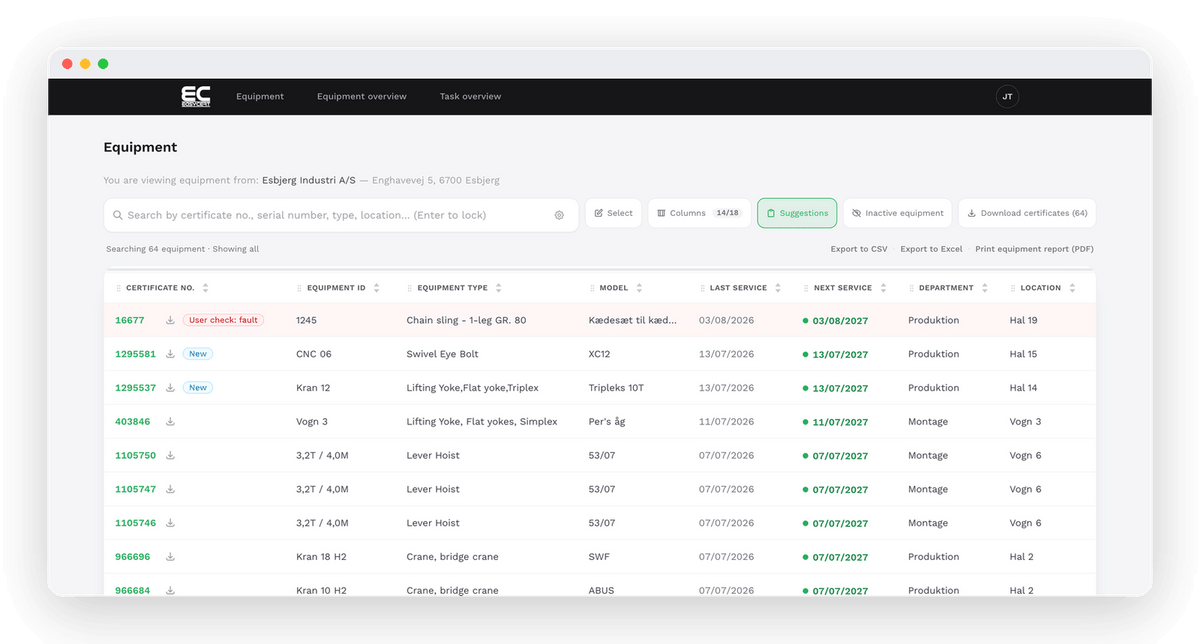
Search by certificate number, equipment ID, type, make, serial number, department or location. Danish and English give the same result, so a search for shackle also finds sjækel.
If you need equipment with a specific capacity or length, you can search by dimensions. You can also describe what you need in your own words. EasyCert then suggests the search criteria, and you adjust them before you search.
The documentation is ready before anyone asks
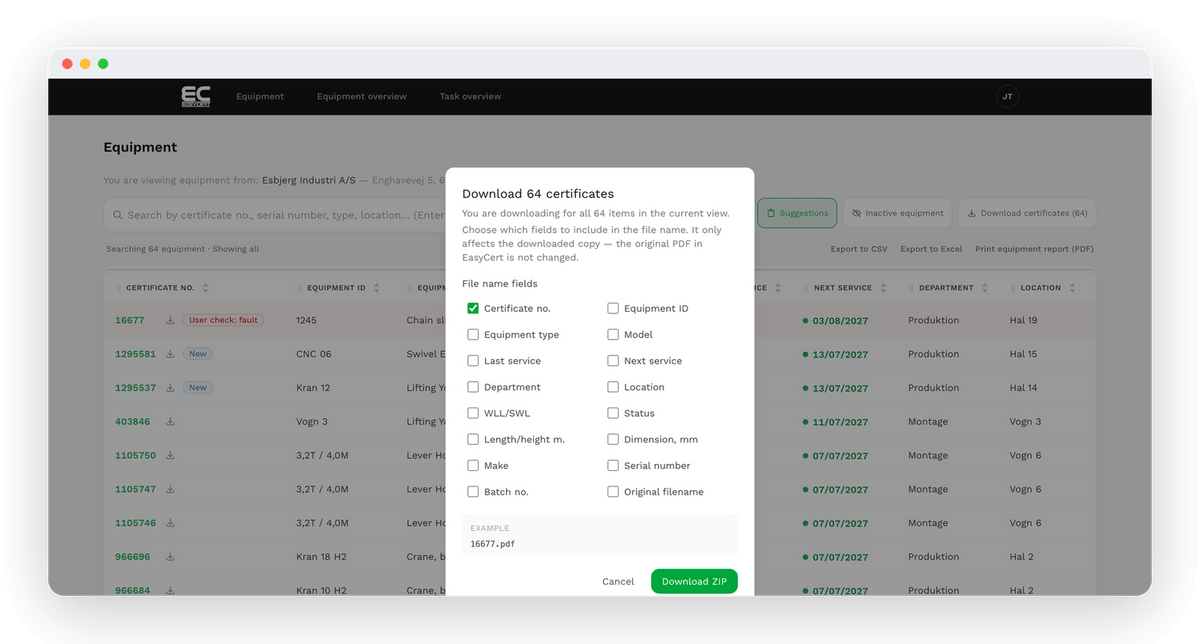
The certificate is in EasyCert as soon as we have registered the inspection. You can download a single certificate or many at once as a ZIP file, and you decide what the files are called.
If the authorities or one of your customers need an overview of everything, you can create an Inspection Certificate Report with all inspections.
See what is overdue and what is due for inspection soon
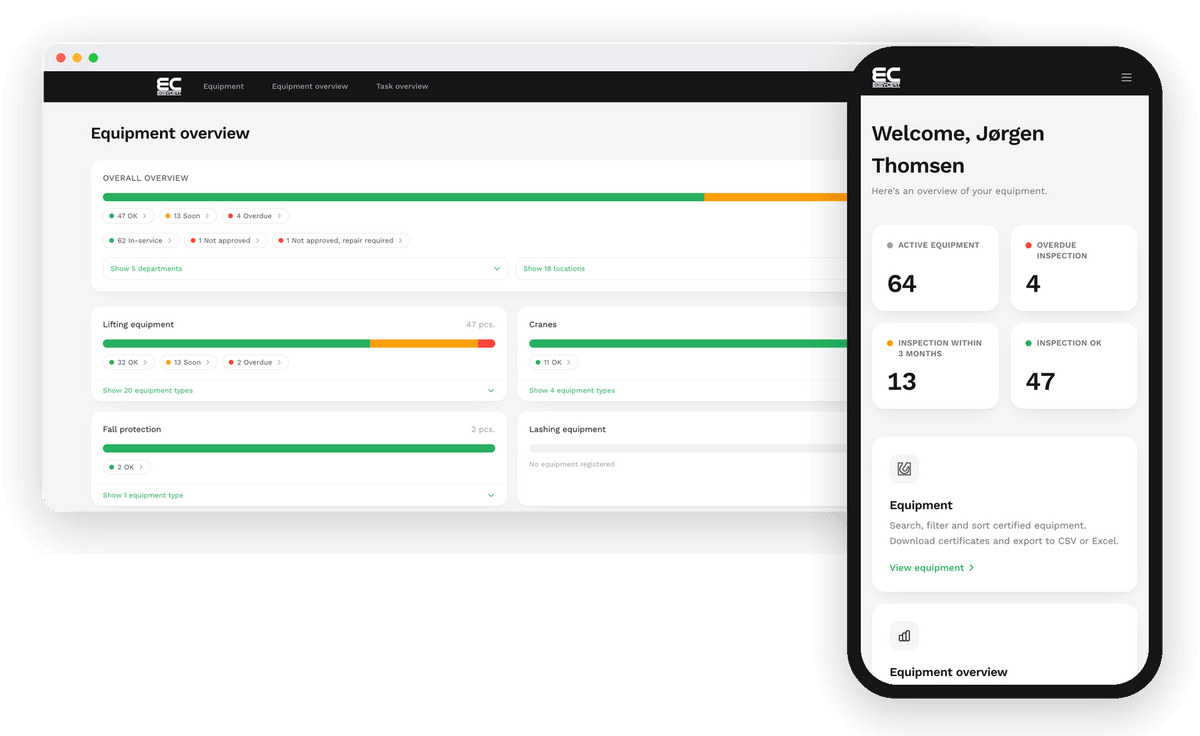
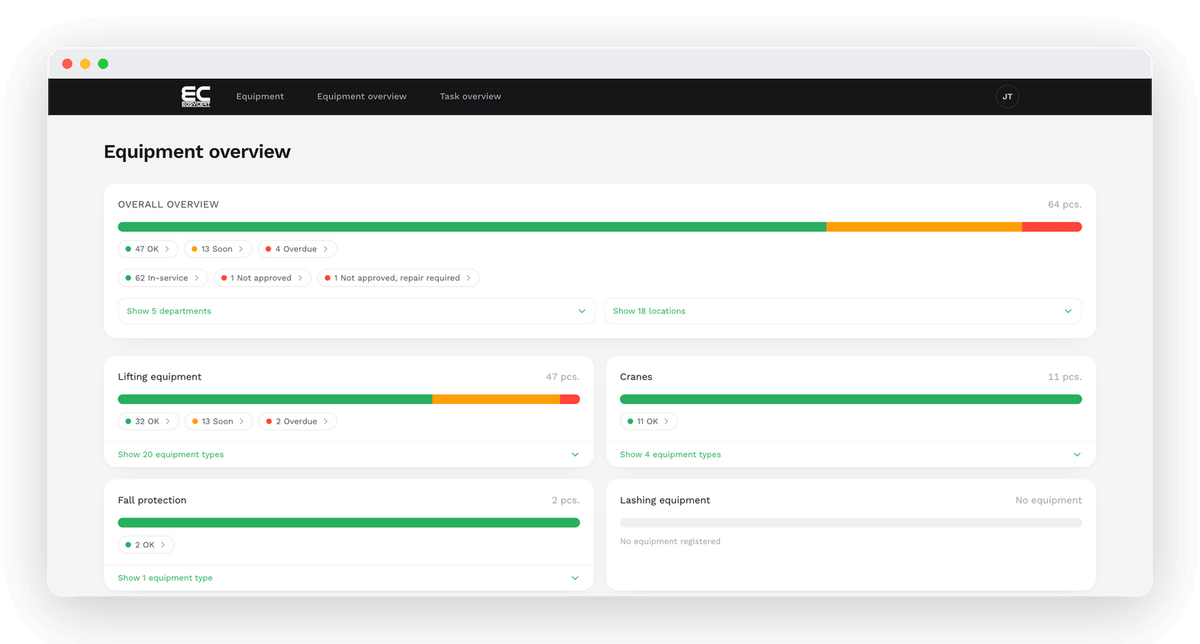
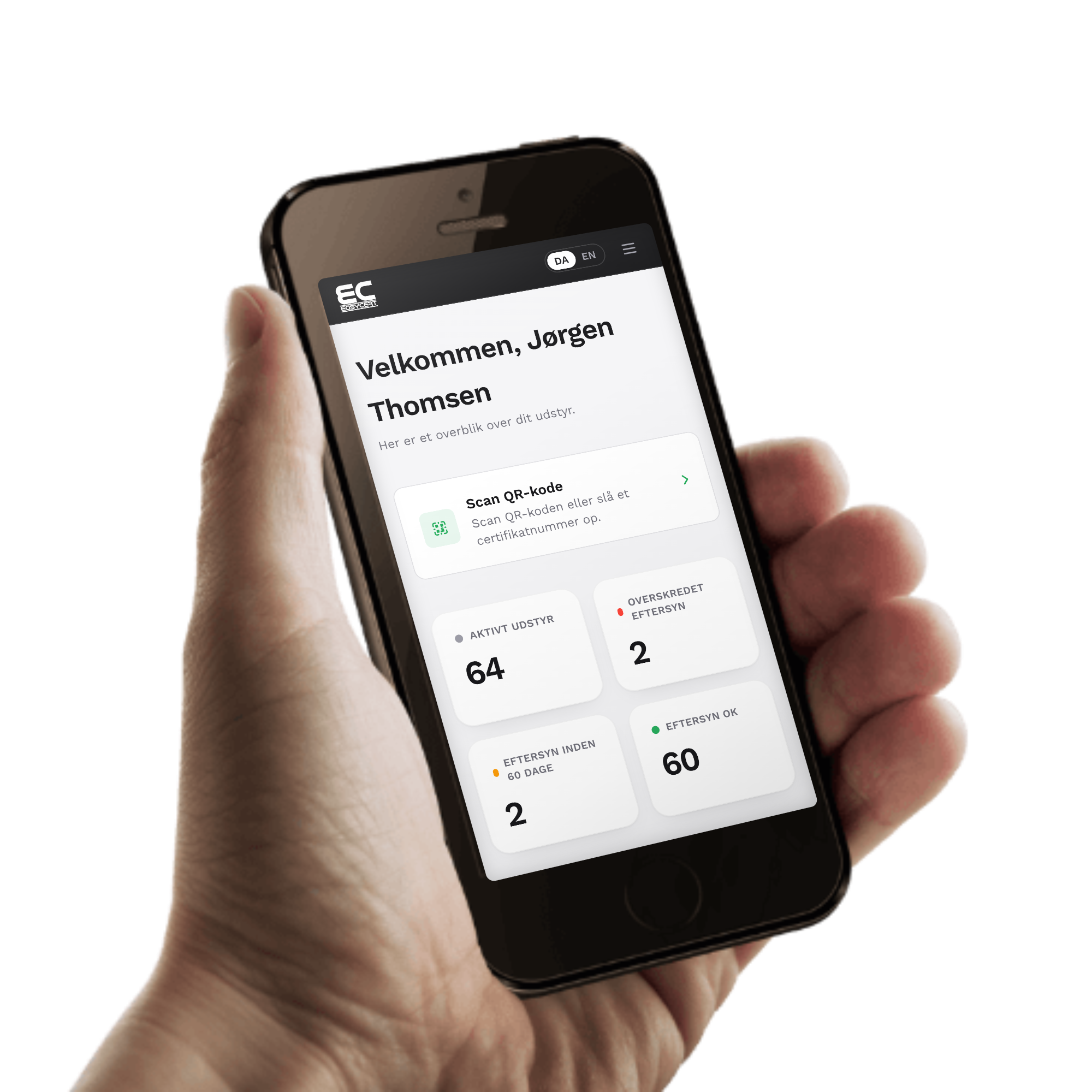
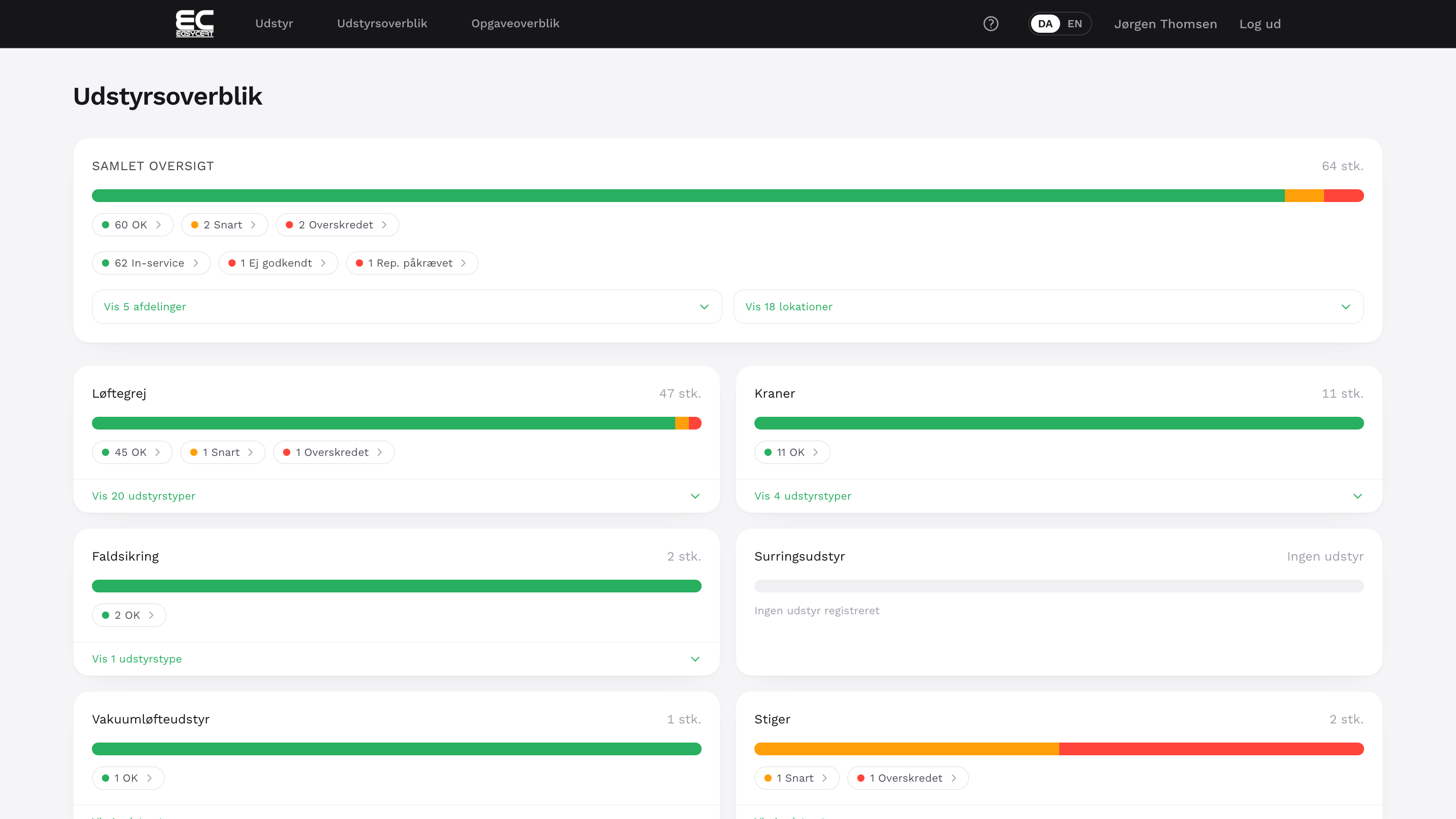
The front page shows how much active equipment you have, how much is overdue and how much is due for inspection within three months. Red means overdue, yellow means due soon and green means OK.
Under Tasks you can see upcoming inspections 18 months ahead, so you can plan the statutory inspections with us in good time.
The full history of every piece of equipment
The equipment card brings together specifications, service history, certificates and documents. You can add your own photos, drawings and manuals.
You can edit department, location, equipment ID and comments, also on many items at once. Your changes are sent to us, so our technicians see the same information as you do.
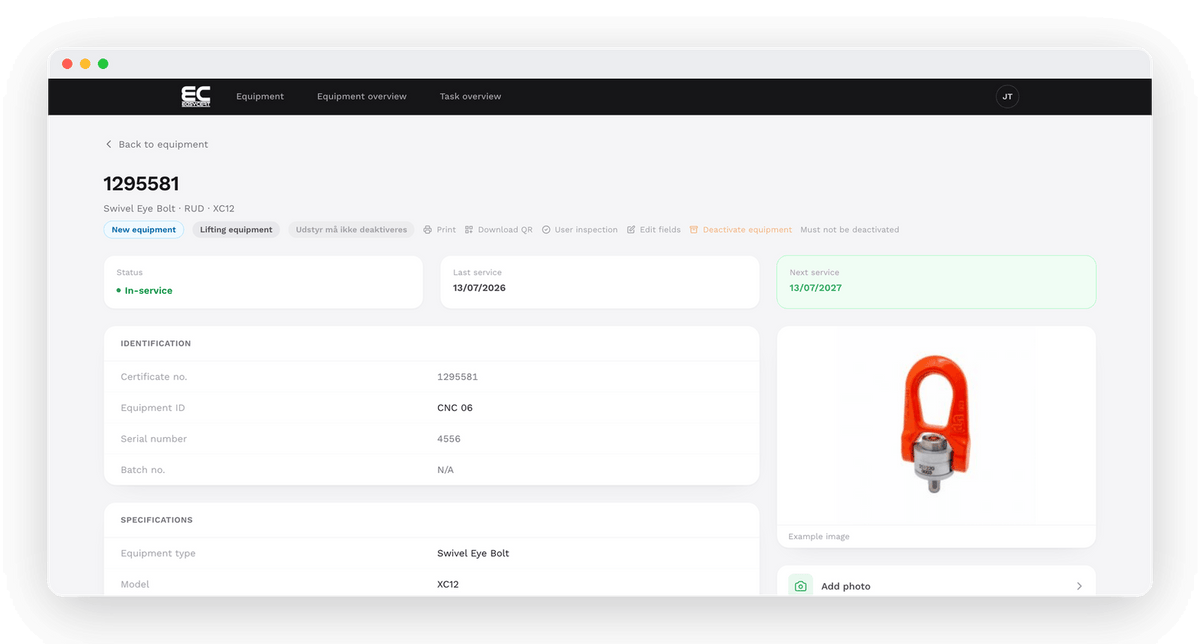
We are one of the market's largest providers of statutory inspections of lifting equipment, cranes and related equipment, and of course we ensure that your documentation when testing your equipment is correct.
Both cranes and lifting gear are marked with our unique tag. It is printed directly from our service system EasyCert and contains the date of the last inspection, the date of the next inspection, our unique ID and, if you wish, can also contain your unique ID number. The back also contains a QR code that easily gives access to all the history of the equipment at hand.
There are products where our label is not attached. These products will be supplied with strips with the unique identification number.
When you choose us as a supplier, you get:
1
Inspection of cranes and lifting equipment according to fixed procedures and documentation on that we always follow them.
2
Individual marking of gear with full traceability and visible color code.
3
Online immediately - your certificate is immediately available after the inspection.
4
Registration of all your equipment in EasyCert, it gives you the full overview of all your gear.
5
Individual certificates on all your gear. We ensure that you always comply with applicable legislation.
6
The individual certificates contain a description of what has been checked, done and the reasons for any non-approvals and documentation for all replacements.

Get an overview of all your lifting equipment
EasyCert is your online portal, where you can get a complete overview of all your lifting equipment via your own username/login.
Each individual piece of equipment is registered in connection with the inspection carried out and has its own individual ”master card”, with all relevant information such as type, model, WLL, ID no., supplier, etc.
Your certificates 24-7-365
When we have inspected your equipment, everything will be marked with individual ID numbers. Regardless of when, you will via EasyCert be able to enter the equipment's ID number and find the product's master card with the associated certificate.
EasyCert is a ”free service” offered to all Fyns Kran Udstyr customers. What was previously reserved for a few selected customers is available to everyone - we do not consider the safety of ”smaller” customers to be less ”important”.

Warning lights
Via simple color coding, you will be able to quickly form an overview of your equipment, including what is due for an inspection and also what needs to be inspected within the next 3 months.

More than a multi search tool
EasyCert is a "multi-search tool" that provides countless options for direct searches for specific tools / certificates, or possibilities to sort by either types, makes, lifting capacity, etc. The system is simply built and this means that you don't have to have physical papers lying around in folders, in the event that the Labor Inspection Authority or other authorities come to visit.
You also have can also have your utilization of the platform. The fields "Department" or "Location" are intended for our customers' own wishes. For example, "Production dept." – "Hall 1". This will delimit and show exactly the equipment located at the respective locations, which you as a user can edit via your own login.

Simple export and import
At FKU, it is important to us that EasyCert is not, and never becomes, a hidden ”supplier lock-in”. We are aware that lifting equipment is also bought from our competitors, which is why we help upload equipment purchased from our industry colleagues - and also make it possible for the individual user to upload individual certificates for the purchased equipment themselves.
More things you can handle yourself in EasyCert
Scan the tag and see the certificate without logging in
The equipment we inspect gets a tag with a QR code and a unique ID. When you scan the code with your phone, the equipment card opens with its status and certificate.
You don't need to log in, so a subcontractor or an inspector can see it too. The link in the QR code is signed, so nobody can guess their way to other customers' equipment. If the tag is worn, you can type in the ID instead.
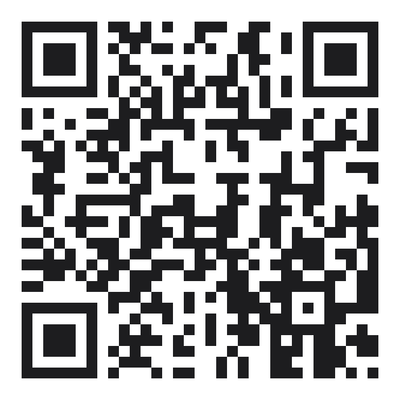
Try it yourself: scan the code with your phone and see an equipment card from our test customer.
Try it yourself: open an equipment card from our test customer, exactly as it looks when you scan the tag.
Open the demo equipment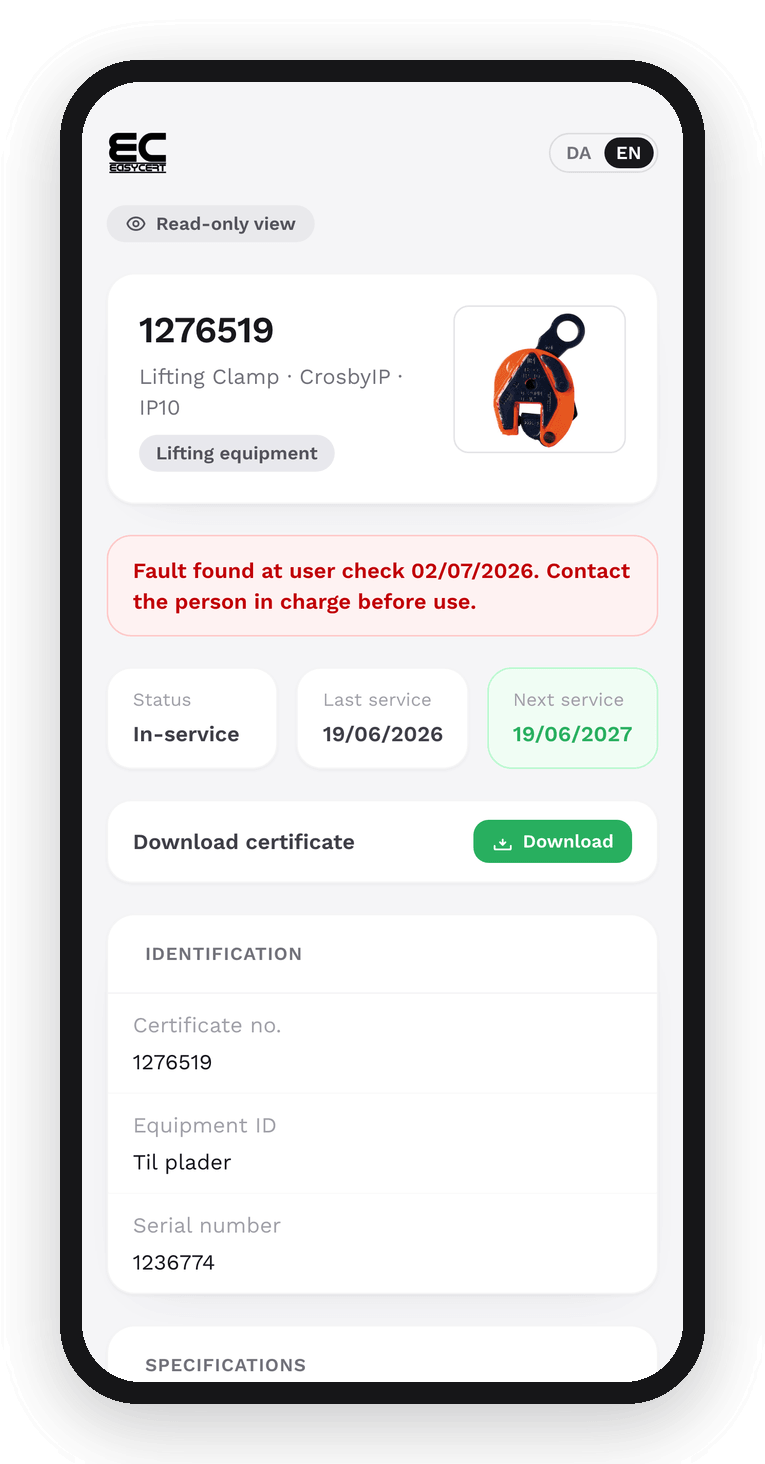
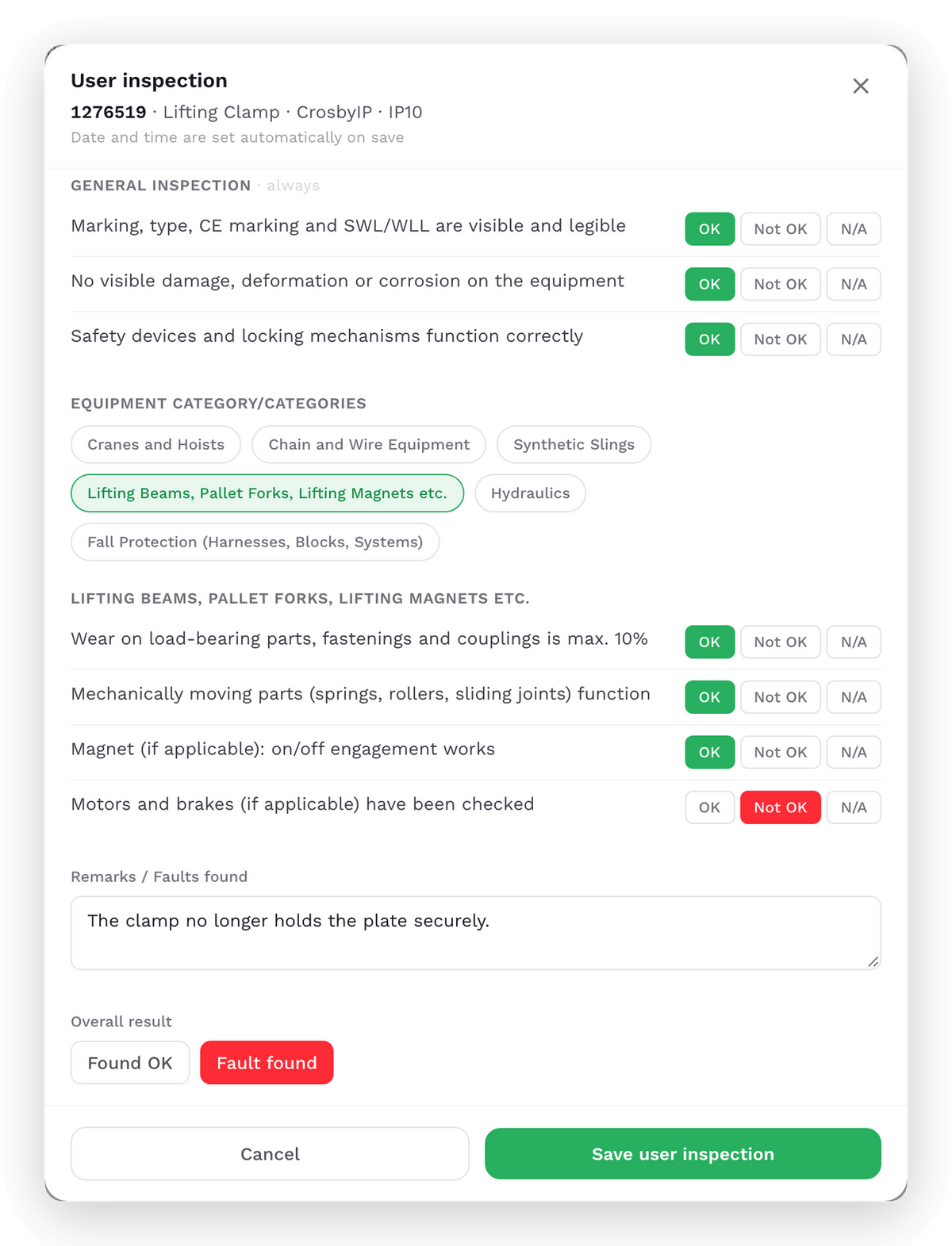
Daily user inspection with a finished report
Go through the checkpoints on your phone or computer and mark each one OK, Not OK or N/A. EasyCert saves the result as a PDF on the equipment.
If someone finds a fault, the person responsible gets an email, the equipment is flagged in the list, and our technician can see the fault. All users can carry out a user inspection, including those with read-only access.
Bring EasyCert data into your own systems
With the EasyCert API, your ERP system, maintenance plan or AI assistant can look up equipment, status and certificates directly.
Access is read-only and limited to your own data. Your administrator creates the keys under Users.
More new features in EasyCert 2.0
Three access levels
Administrator, editing or read-only. Your own administrator creates the users and decides who can make changes.
Log in without a password
If you log in with your email, EasyCert sends you a one-time code. Colleagues without a company email can get a fixed username and password.
New equipment is marked
Equipment added since last time gets a New tag, so you can see that it has been included.
Edit and undo
If you change something by mistake, you can undo it. To deactivate equipment you have to give a reason, so you can always see why.
Inspection every 6 months
Equipment inspected every six months, for example under British standards, offshore or in data centres, has its own view.
Danish and English
EasyCert is available in Danish and English. You switch language at the top of the page.
What's new in EasyCert 2.0?
From EasyCert 1.0 to EasyCert 2.0
In addition to a more modern design, EasyCert 2.0 also brings a number of concrete improvements and new features. These include a new and smarter search function that lets you combine search criteria, a consolidated overview of equipment and deadlines, the option to add your own documents and certificates, daily user checks and much more!
Download our EasyCert app
- all your certificates for your lifting equipment at your fingertips - completely free of charge
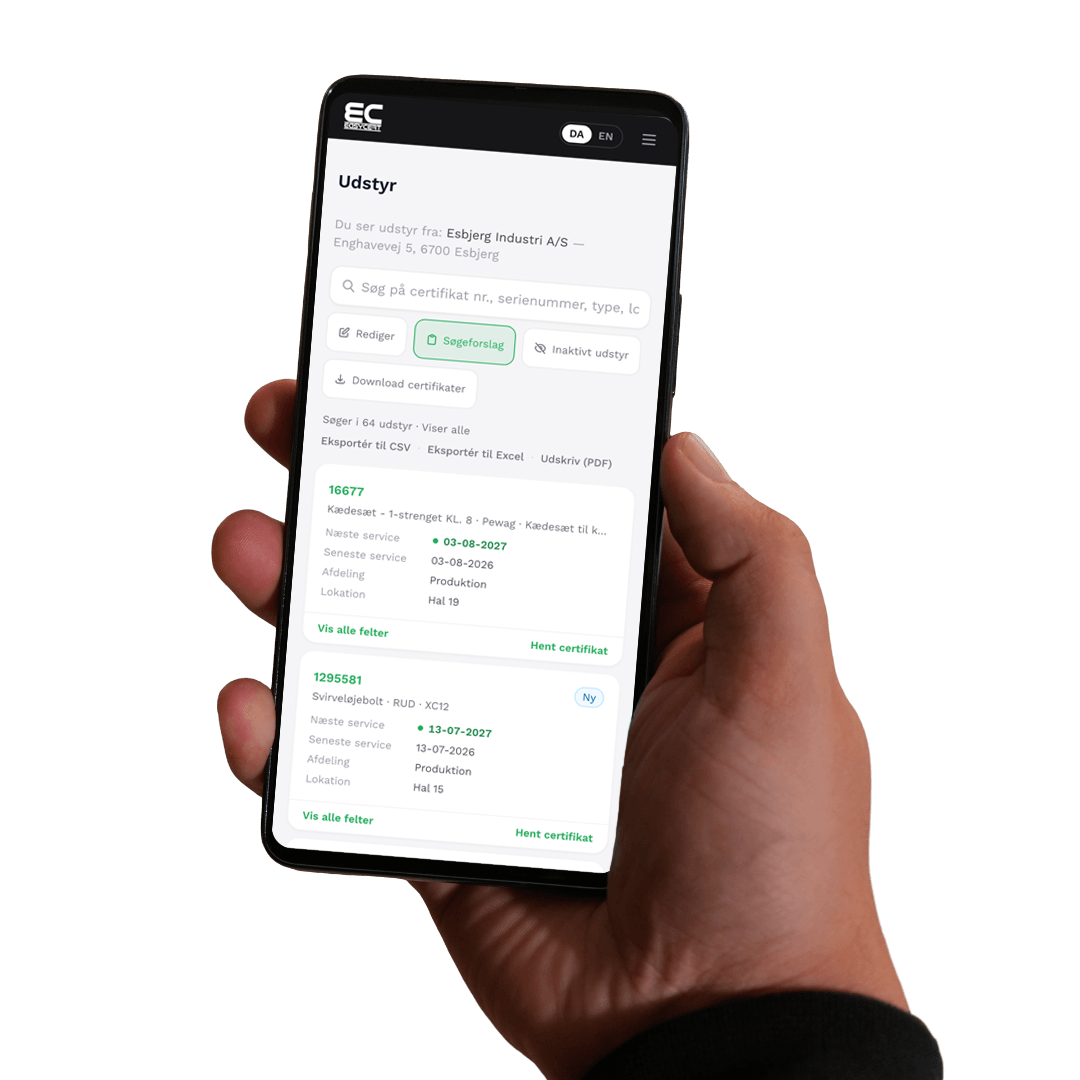
With our EasyCert app from Fyns Kran Udstyr A/S on your mobile device, you can easily and quickly get a full overview of your statutory inspections and access the certificates on all your lifting equipment.
You simply log in with your login, and then via the ID numbers on the inspected lifting equipment, or via the attached QR code, you can see all information about the specific lifting equipment and download the statutory certificate.
You can also edit the fields Department, Location and write comments on the individual equipment. In addition, documents and images can also be uploaded to the individual equipment.

Download the EasyCert app for Apple on the App Store.

Download the EasyCert app for Android on the Google Play Store.

NCC Civil Egineering keeps track of certificates, lifting equipment and costs with EasyCert from Fyns Kran Udstyr
Civil Engineering is a department in NCC which is involved in many different projects, and this requires control of the lifting equipment for the individual jobs.
NCC Civil Engineering primarily deals with infrastructure and complex concrete constructions, and daily life is therefore spent solving tasks within climate protection, water and drainage, cable renovations, cable rerouting and tunnelling. The jobs are many and the complexity is often high.
New unique overview
Overview of lifting gear and related equipment was previously a major challenge for the department, Civil Engineering. The problem that was often experienced was that one department of NCC Civil Engineering could have a certain type of lifting equipment that another department needed to use during a job. But since no one had the opportunity to get an overview of the equipment and thus be able to move it internally between the departments, it often became the more expensive solution to rent or buy new equipment, while the equipment you already had the equipment laying around gathering dust. And this was an overly expensive and resource-intensive model. The Civil Engineering department was therefore looking for a system that, in addition to being able to provide easy access to the statutory documentation, could also provide a precise overview of which lifting equipment is available in the individual departments. The solution was EasyCert from Fyns Kran Udstyr, which is an online-based system that easily creates an overview of registered equipment and at the same time has all documentation and data gathered in one place.
Now NCC Civil Engineering has a full overview of their equipment, and in addition to resource optimization, NCC Civil Engineering has also experienced another significant difference – they now have online access to the statutory inspection certificates. Previously, a printed version in paper form had to accompany the individual equipment - with EasyCert, NCC Civil Engineering can find it immediately both on the web and on mobile devices via the EasyCert app.
EasyCert also holds up in the real world
"The system fully meets our expectations, it saves us unnecessary costs and we can find our certificate via the EasyCert app without any problems at the various workplaces - regardless of where it is in the world", says Kristian Andersen from NCC Civil Engineering.

BMS A/S: Best Practice on documentation
That we ourselves think that our EasyCert is smart is one thing, but having it confirmed by our customers is much more valuable.
We have just visited one of our customers, the BMS group, who use EasyCert in their daily lives, and who tell us why certificates and availability are so important in terms of safety and documentation.

BMS – an old Danish player on the international scene
Safety and documentation are a completely natural part of everyday life for the BMS group, who on a daily basis need to be able to document both data and certificates for inspection of lifting equipment in relation to their work within mobile cranes and lifts. They have been in the industry for a long time and know the importance of safety and documentation.
BMS's journey starts way back in 1953 in Copenhagen, as a state-owned company (Byggeriets Maskin Stationer A/S) and since then the company has grown - both through organic growth but also through a series of acquisitions. The Engaard family, who today own BMS, took over 100% of the company in the late 2000s. The BMS Group has grown to be among the world's largest within mobile cranes and lifts, and today BMS is a multinational company with activities in e.g. Sweden, Norway, Germany, Poland, Great Britain, South Africa, USA and Australia

A focus on safety
As a crane company, BMS has a natural focus on safety and documentation, and at BMS they have taken the concept of 'safety' to new heights. The company is certified according to the ISO45001 standard with the aim of ensuring a heightened focus on safety in order to meet requirements and regulations on safety within the industry.
In this connection, BMS has undertaken a large number of other initiatives that focus on safety, and a good example is a specially designed e-learning platform, which is used both by BMS employees and also by the company's customers. See more of the company's HSEQ initiatives at BMS.dk.

Strong collaboration
Fyns Kran Udstyr carries out statutory inspections of all BMS's lifting equipment throughout Denmark, and a large part of daily life at BMS is about safety and documentation, so the requirements for EasyCert are big. It is very important to BMS that documentation on the lifting equipment 'on board' the BMS cranes is approved and ready for use at any time because it is an important part of everyday life.
Per Holm Davids and Nicklas Lund both have extensive experience in working with BMS's jobs in the construction of data centres. Per says; "We depend on using EasyCert especially in connection with the large data center constructions. Here, the English standards must be followed, that is, the lifting equipment must be inspected at least every 6 months, where in Denmark it is normally every 12 months. Fortunately, EasyCert can easily work with this interval in relation to documentation and certificates”.

EasyCert is called 'Best Practice' by professionals
Previously, all documentation had to be delivered on paper to document inspection of the lifting gear on the cranes, and here EasyCert has a huge advantage, because the documentation does not have to be printed and everything is at hand if documentation is needed.
Per explains; “EasyCert has been accepted on many of the large data center construction sites by the people responsible for checking documentation and safety for inspection of lifting equipment. The control unit can easily gain access to scan the equipment itself, or look it up with the EasyCert App - the solution has even been called 'Best Practice'," says a smiling Per.
Questions and answers about EasyCert
What does EasyCert cost?
Nothing. EasyCert is free for all customers who have their equipment inspected by Fyns Kran Udstyr. That goes for both easycert.dk and the app.
How do we get access?
Contact your service coordinator with us. We set up your company and an administrator on your side, who can then create more users. Not a customer yet? You can become a customer here.
How do I log in?
Go to easycert.dk or open the app. If you have a login with an email address, you get a one-time code by email, so there is no password to remember. If you have a username, you log in with that and your password.
When can we see the certificate after an inspection?
As soon as the technician has registered the inspection with us. EasyCert fetches new information from our service system every 15 minutes.
Can others see a certificate without logging in?
Yes. Scanning the QR code on the tag opens the equipment card with its status and certificate in a read-only view. That way a subcontractor or an inspector can check the equipment without a login. You can only see the piece of equipment the code is attached to.
What do we do if the QR code is worn?
Type the equipment ID or certificate number in the search field on easycert.dk or in the app. If you need a new tag, please contact us.
What do the colours mean?
Red means the inspection is overdue. Yellow means the equipment is due for inspection within three months. Green means it is OK.
Can we edit equipment information ourselves?
Yes, if your user is allowed to edit. You can change department, location, equipment ID, model and comments, also on many items at once. Your changes are sent to us, and you can undo them.
Can we add equipment from other suppliers to EasyCert?
Yes. We help you add equipment you have bought elsewhere, and you can upload certificates for it yourself. That way you have everything in one place.
Does the app work without a signal?
Documents you have already opened in the app can be viewed without a signal. Everything else needs a connection.
Can our own systems fetch data from EasyCert?
Yes. Your administrator can create an API key under Users. With it, your ERP system or AI assistant can read your equipment, status and certificates. The key only gives read access to your own data.
How do we book an inspection?
Contact your service coordinator. You will find the contact details at the bottom of this page. In EasyCert you can see upcoming inspections 18 months ahead, so you can plan the statutory inspections in good time.
Do you have questions about EasyCert?


Get a call

